
Like many of you, I’m for getting the cleanest image possible while shooting. Raising that ISO up to levels where you see lots of banding and image noise isn’t really worth it for selling your shots considering how much post-process noise reduction you have to do. Therefore, anything less is totally unacceptable, right? Well, not all the time. If you look at old film photos you’ll see that this isn’t always true. Additionally, there’s lot more you can do besides making the image smaller to hide the flaws. Here’s how to use Image Noise to your advantage:
Black and White
The above shot is terribly grainy. Even when it’s that small you can see the image noise all over it. However, if you convert the image to black and white it suddenly brings out areas of the image that may not be visable in full color and also gives it a totally different feeling. In that image (taken at South St. Seaport in New York City) one can get an old vintage newspaper type feel when looking at it. All this is because of the subject matter and the black and white amongst other reasons.
Edit It to Ensure Emotions Are Felt No Matter What
In photojournalism, you’re taught that there are elements to every good shot: intimacy, newsworthiness, emotions, and the unusual. Therefore, don’t just take some random image and try to pass it off as artwork. Make sure that when it’s edited that everyone feels something from the picture.
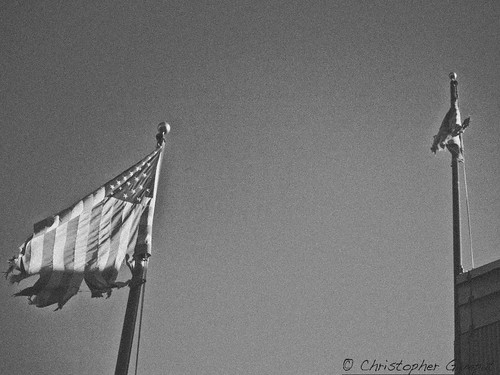
The above image was shot totally clean and free of any image noise and graininess. It was all added in post production. However, it gives the impression and feeling that those flags are old and need to be replaced. Further, if you didn’t know that this image was shot this summer then you may think that the image is very old and that it could be from a time of extreme hardship in America.
In truth, the flags are just old and desperately need to be replaced.

Blur The Photo A Bit
Your picture can still be in color for full viewing but you can still mask the ISO if you’d like by blurring the image. Depending on how the image noise may look, you can deliver a more dream-like feeling to the photo. People love these-especially in Wedding photos. All you need to do is ensure that you’re shooting in RAW and adjust the clarity levels once you put it into Photoshop. I do all this type of stuff very easily with just Photoshop Elements. These dreamy images elicit emotions in viewers that make them smile and get a nostalgic feeling.
In the case of the above photo, a girl I know was sitting next to me going through the images I took. She loved this image and wanted it. So I edited it in front of her and surely enough her eyes lit up when she saw the “dreamy” version of the photo vs the original, which was quite noisy to be honest.

If It’s there, Embrace It!
In the above image, the noise and banding from ISO 1600 is clearly evident and getting rid of it may potentially make me lose detail unless I’m careful. So I took the alternative route–embracing it. I added even more image grain in Photoshop. The key is to keep playing with it until you achieve a look that is not only appealing but that you can use to your advantage in the pitch to your clients. The image above is plagued with noise issues but it works because of the old ISO 1600 film grain type of look.
All of this comes with the general philosophy of not working around “mistakes” but instead using them and making them adapt to work for your benefit. It’s a philosophy that can do very well for you and help you work through problems such as High ISO problems.


Great post :)
Funny, just a few hours(!) ago I had a conversation with a fellow photographer about the pros and cons of ‘digital’ noise.
‘Film’ noise got that classic touch to it, while digital noise make the photo, in some cases, just look bad.
I agree that turning the image to black and white, with a slight touch of noise cleaning, might fix the first impression.
Here is an example where I ’embraced’ the noise, photo taken on the streets of Barcelona –
http://www.ilanbresler.com/2009/05/what.html
@ Ilan- That with your D50? It’s beautiful.